

AI Receptionist for Small Business: Costs, Features, Use Cases & What to Look For in 2026
What an AI receptionist can realistically do, what drives the cost, how it compares with answering services and voicemail, and how to test one on your real calls before you commit.
In this article
An AI receptionist for small business is no longer just a voice bot that answers with a scripted greeting. In 2026, the useful version is a call-handling layer that can answer routine questions, identify why someone is calling, capture lead details, check availability, book or reschedule appointments, route urgent calls, summarize conversations, and hand off to a person when the request falls outside clear rules.
That matters because small businesses are already building more of their daily operations around technology. The U.S. Chamber of Commerce reported in October 2026 that nearly every U.S. small business uses at least one technology platform, 41% use six or more platforms, and 66% use AI. For an owner who is already using a CRM, booking calendar, payments system, or job-management tool, the next question is often not whether software should answer the phone. It is whether phone conversations can connect cleanly to the systems that already run the business.
This guide explains what an AI receptionist can realistically do, what it costs, where it fits, where it does not, how an AI receptionist compares with a live answering service or voicemail, what U.S. businesses should know about compliance, and how to evaluate an AI receptionist with appointment booking, CRM integration, call routing, summaries, text follow-up, and human handoff.
Quick answer: what is an AI receptionist?
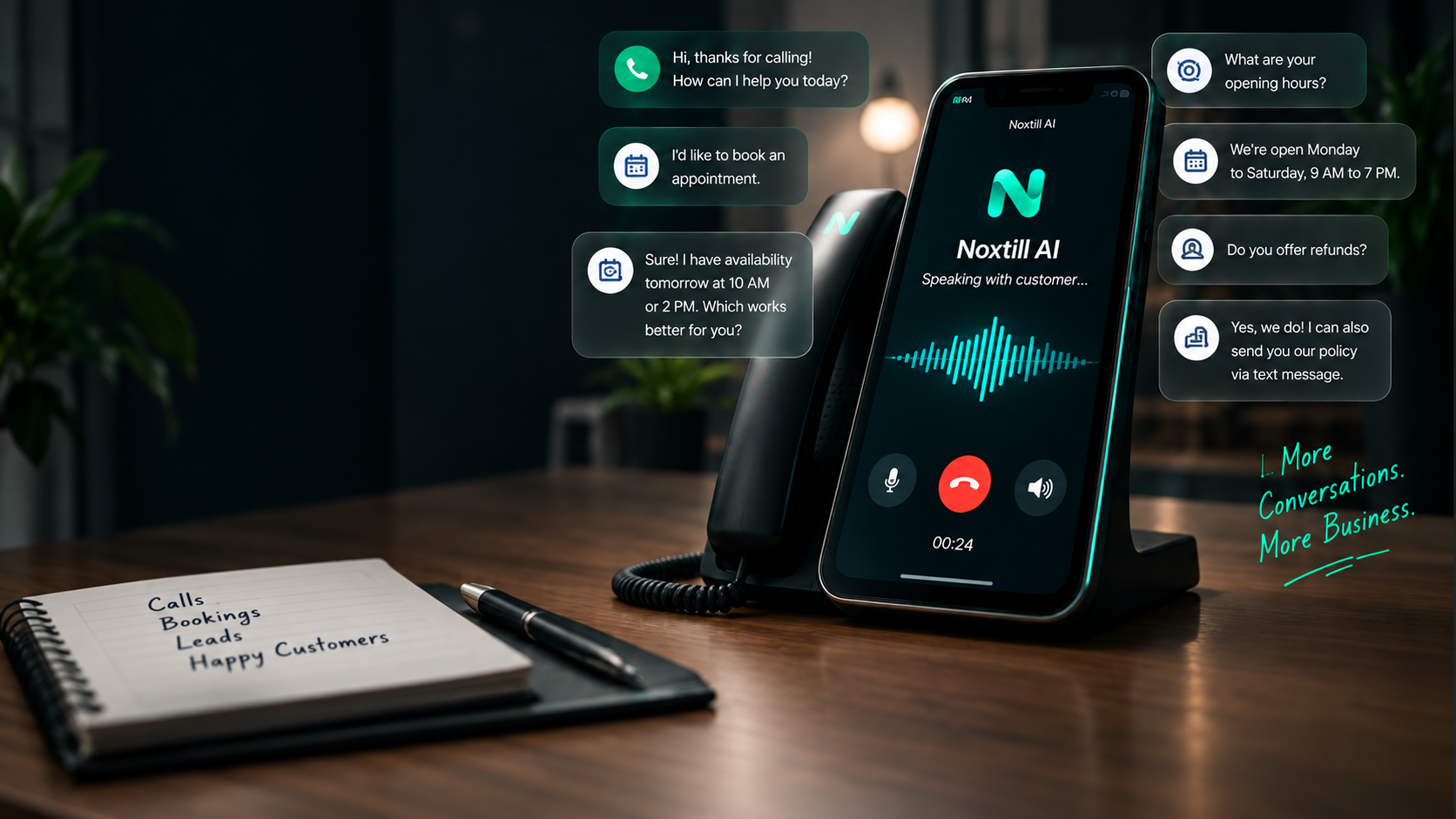
An AI receptionist is software that uses conversational voice technology to answer incoming business phone calls and perform defined front-desk tasks. A well-configured AI phone receptionist for small business can greet callers in the business name, answer questions from an approved knowledge base, collect contact details, qualify a lead, check a calendar, schedule an appointment, transfer a call, create a follow-up task, and save a call summary to a connected customer record.
The important word is defined. An AI receptionist system should not guess about prices, policies, medical advice, legal advice, refunds, contracts, or other high-impact decisions. The strongest small-business setup combines automation for routine requests with a clear AI receptionist with human handoff path for exceptions.
How does an AI receptionist work?
A virtual AI receptionist for business typically sits between the phone number and the systems that hold business context. When someone calls, the AI voice receptionist for small business processes speech in real time, maps the request to an intent, retrieves approved information, and decides whether it can complete the task or needs to escalate it.
- STEP 1 · ANSWER
Answer the call and identify the business. The greeting should make it clear who the caller reached and, when appropriate, that an automated assistant is handling the call.
- STEP 2 · UNDERSTAND
Understand the reason for the call. The system may classify the request as a new lead, existing booking, billing question, service-area question, support request, urgent escalation, or another defined category.
- STEP 3 · LOOK UP
Look up approved context. An AI receptionist with CRM integration can find an existing customer record, while an AI receptionist with calendar integration can check real availability instead of inventing a time slot.
- STEP 4 · ACT
Take a permitted action. Depending on permissions, the AI receptionist that books appointments can create or reschedule a booking, send a confirmation, route the call, or create a follow-up task.
- STEP 5 · RECORD
Record the outcome. A useful AI receptionist with call summaries should leave a concise transcript or summary, caller details, intent, actions taken, and any unresolved next step in the customer record.
- STEP 6 · ESCALATE
Escalate exceptions. High-value, sensitive, unusual, angry, or ambiguous calls should move to a human instead of forcing the automation to continue.
What can an AI receptionist do for a small business?
What an AI receptionist can do depends on the integrations and the rules the business gives it. The best small business AI phone answering setup focuses on repetitive front-desk work that has a clear answer or a clear next step.
- Answer common questions about opening hours, service areas, appointment types, location, parking, basic policies, and how to prepare for a visit.
- Capture a new lead and collect name, phone number, email address, service need, preferred time, ZIP code, or other qualifying fields.
- Book, reschedule, or cancel appointments when the booking system exposes real availability and the workflow is permitted.
- Route calls to the right person or team, including urgent-call rules and after-hours escalation.
- Send an SMS follow-up or booking confirmation when consent and messaging rules are satisfied.
- Create a customer record or add the call to an existing CRM profile.
- Generate call summaries for the team so a staff member can pick up the conversation without asking the caller to repeat everything.
- Trigger a missed-call workflow when a call cannot be completed, helping the business capture and follow up on demand that would otherwise sit in voicemail.
Can AI answer business phone calls 24/7?
Yes, an AI receptionist can work 24/7 from a technical standpoint, which is why questions such as how to answer business calls after hours, and whether a 24/7 answering service for small business is worth it, are growing in practical importance. But “always available” should not mean “always authorized.” After-hours behavior should usually be narrower: answer routine questions, collect lead details, book only allowed appointment types, and escalate emergencies according to a documented policy.
Can AI book appointments by phone?
Yes, if the phone agent is connected to the real calendar and booking rules. An AI receptionist with appointment booking should check staff availability, service duration, location, buffers, capacity, and business rules before it confirms anything. This is the difference between an AI phone agent for appointment scheduling and a generic chatbot that merely says it will “request” an appointment.
AI receptionist cost: what actually drives the price?
AI receptionist pricing varies widely because vendors do not all bill the same way. When a business asks how much does an AI receptionist cost, the useful answer is to compare the unit of billing and the operational coverage, not just the advertised monthly number. AI receptionist cost for small business may be based on minutes, calls, conversations, phone numbers, locations, agents, or a platform subscription.
An affordable AI receptionist for small business is not necessarily the product with the lowest sticker price. A cheap AI receptionist for small business can become expensive if it charges heavily for overage minutes, requires separate integrations, cannot resolve routine calls, or creates staff work because summaries and customer records are incomplete.
For a fair AI receptionist vs receptionist cost comparison, calculate total loaded human coverage, not only hourly wage. For a fair AI receptionist vs answering service cost comparison, include call quality, booking completion, data capture, integrations, and whether the live answering service can perform real actions or only take messages. Avoid relying on vendor-specific price claims in an evergreen guide unless they are checked directly on the vendor’s current pricing page.
| AI receptionist | Live answering service | Voicemail | In-house front desk | |
|---|---|---|---|---|
| 24/7 availability | ✓ Yes, with narrower after-hours rules | Depends on the plan | ✕ Records messages only | ✕ Staffed hours only |
| Booking | ✓ When connected to a real calendar | Varies; often message-taking | ✕ No | ✓ Yes |
| CRM write-back | ✓ When integrated | Often limited | ✕ Manual entry | Manual or integrated |
| Human judgment | Escalates to staff by rule | ✓ Yes | After a callback | ✓ Yes, with the most context |
| Cost model | Subscription and/or usage | Per minute, per call or plan | Low or included with phone service | Wages, benefits and coverage gaps |
AI receptionist vs answering service vs virtual receptionist vs voicemail
| Option | Best at | Main limitation | Typical fit |
|---|---|---|---|
| AI receptionist | Routine calls, appointment booking, lead capture, call routing, summaries and connected workflows | Needs clear rules, integrations and human escalation | Businesses with repeatable call patterns and enough call volume to justify automation |
| Live answering service | Human conversation and message-taking across broad situations | Can be less connected to business systems and may not complete transactions | Businesses that want external human coverage |
| Virtual receptionist | Remote human front-desk support with broader judgment | Higher labor cost and finite staffing coverage | Businesses needing personalized human handling without an on-site hire |
| Voicemail | Low-cost message capture | Callers cannot get an immediate answer or complete a task | Very low call volume or businesses where callbacks are acceptable |
| In-house receptionist | Highest context, judgment and relationship continuity | Salary, coverage gaps, training and scheduling | Businesses with enough volume and complexity to justify dedicated staff |
This is why “AI receptionist vs answering service” is not a simple technology-versus-human question. The better decision is which calls should be automated, which calls should be handled by a live answering service, and which calls should reach an employee. Some businesses will deliberately use a hybrid model.
Who should use an AI receptionist?
An AI receptionist is a strong fit when calls are frequent enough to matter, a large share of requests can be handled with clear rules, and the business has structured systems for customers, bookings, jobs, or availability. It is especially useful when staff are often away from the desk or working directly with customers.
Industry examples
- AI receptionist for contractors: capture project type, ZIP code, urgency, and preferred visit time; route high-value or emergency calls to the right person.
- AI receptionist for home service business: answer service-area questions, create a lead, schedule an estimate, and connect the conversation to field-service records. See the industry page →
- AI receptionist for plumbers, HVAC companies, electricians and roofers: collect job details while technicians are on-site and unable to answer the phone.
- AI receptionist for landscapers and cleaning business teams: book recurring or one-time service requests and confirm location details. See the industry page →
- AI receptionist for auto repair shop or car detailing business: answer hours and service questions, take vehicle details, and request or create appointment slots. See the industry page →
- AI receptionist for salons and spas: book, reschedule and confirm services while front-desk staff are helping guests. See the industry page →
- AI receptionist for dental office or clinics: support scheduling and non-clinical administrative questions while routing clinical or sensitive requests to staff. Healthcare use requires stronger privacy and workflow controls. See the industry page →
- AI receptionist for property management or real estate business: distinguish prospective tenants, existing residents, maintenance requests and sales inquiries. See the industry page →
- AI receptionist for law firms and accounting firms: capture structured intake information but avoid giving legal, tax or accounting advice.
- AI receptionist for gyms and wellness businesses: answer membership and schedule questions, book consultations and route account-specific requests. See the industry page →
Trade pages: HVAC · Plumbing · Electrical contractors
When an AI receptionist is the wrong tool
Should a small business use AI receptionist technology in every situation? No. It is a poor fit when nearly every call needs nuanced judgment, the owner’s personal relationship is the product, call volume is extremely low, the business has no reliable calendar or customer records, or the team is unwilling to maintain the knowledge and escalation rules the AI depends on.
- Do not automate advice that should come from a licensed professional.
- Do not let the AI invent prices, availability, refunds, or policy exceptions.
- Do not route sensitive customer information into systems that are not approved to handle it.
- Do not make the caller fight through a rigid bot flow when a person is clearly needed.
- Do not launch without a process for reviewing transcripts, errors, escalations and unresolved calls.
U.S. compliance: inbound AI reception is different from outbound robocalling
Small businesses should separate two use cases that are often mixed together in marketing copy: an AI receptionist answering an inbound call that the customer chose to make, and an AI system placing outbound calls to consumers. The Federal Communications Commission has confirmed that AI-generated voices used in outbound calls are treated as artificial or prerecorded voices under the Telephone Consumer Protection Act. Depending on the call, prior consent, identification, disclosure and opt-out rules may apply.
That does not mean every inbound AI receptionist interaction is prohibited. It means businesses should avoid assuming that “AI voice” removes normal telephone, consent, privacy, recording, advertising or sector-specific obligations. If the system records calls, state call-recording rules may also matter. If the business handles health, financial, legal or other sensitive information, additional requirements may apply.
For AI governance more broadly, NIST’s AI Risk Management Framework emphasizes trustworthiness, documentation, risk management and appropriate human oversight. For a small business, the practical translation is straightforward: define what the AI is allowed to do, document escalation paths, review failures, and keep people responsible for high-impact decisions.
This section is general information, not legal advice. Confirm requirements for your state, industry and call types with qualified counsel.
How to choose the best AI receptionist for small business
The best AI receptionist for small business is the one that completes the right work accurately, integrates with the systems the team already uses, and fails safely. A long feature list matters less than reliable behavior on the business’s real calls.
- Test your top 20 real call reasons. Include routine questions, messy phrasing, accents, background noise, angry callers, urgent requests and requests the AI should refuse or escalate.
- Verify the booking workflow. Confirm that the AI uses real availability, service duration, location, staff rules and capacity.
- Check CRM write-back. The call should not create duplicate contacts or leave staff with an unusable transcript. Confirm how an AI receptionist with CRM integration matches existing customers.
- Test call routing and human handoff. A caller should be able to reach a person when needed, and the employee should receive context before taking over.
- Review call summaries. Summaries should distinguish facts, customer requests, actions taken and unresolved items.
- Check follow-up controls. If an AI receptionist with text follow-up or SMS follow-up sends messages, confirm consent, templates, delivery status and opt-out handling.
- Understand the pricing unit. Compare AI receptionist monthly cost, overage rules, integration fees and any usage-based charges.
- Review data retention and access. Decide who can see transcripts, recordings and customer information, and how long those records should remain available.
- Measure real outcomes for 30 days. Do not rely on a demo call. Evaluate completed bookings, qualified leads, transfer rate, error rate and staff time spent correcting the system.
How to measure whether an AI receptionist is worth it
Is an AI receptionist worth it? The answer should come from business outcomes, not from how natural the voice sounds. Before launch, record a baseline for answered calls, abandoned calls, bookings created from phone inquiries, lead-response time, staff time spent on routine calls, after-hours inquiries, and customer complaints related to phone handling.
- Call resolution rate
- The percentage of calls that reach a useful outcome without unnecessary escalation.
- Booking completion rate
- Callers who ask to book and receive a confirmed appointment.
- Qualified lead capture
- New inquiries saved with enough information for a meaningful follow-up.
- Human transfer rate
- How often automation hands off, and whether those handoffs were appropriate.
- Correction rate
- Calls where staff must repair a wrong booking, customer record, or summary.
- After-hours capture
- Useful leads or bookings created outside staffed hours.
- Customer friction
- Complaints, repeated questions, hang-ups, or callers asking for a human immediately.
How Noxtill approaches the phone as part of the business system
A phone conversation becomes more useful when it can connect to the rest of the business. In Noxtill, the AI Phone Receptionist is designed to work alongside customer records, bookings, the Unified Inbox, staff context, operational workflows and follow-up activity. That means the goal is not simply to automate customer phone calls. The goal is to prevent the phone from becoming another disconnected channel.
For example, a caller asking for an appointment can be identified, matched to an existing customer record, offered real availability, booked, sent a confirmation, and recorded in the CRM. A request that requires a person can be transferred with context — and can continue as a ticket in Customer Service & Helpdesk. A call that cannot be resolved can create a follow-up instead of disappearing into voicemail. Staff can then ask the AI Assistant what came in overnight.
FAQ: AI receptionist for small business
What is an AI receptionist?
It is conversational software that answers incoming business calls and performs defined front-desk tasks such as answering approved questions, capturing lead details, checking availability, booking appointments, routing calls and recording outcomes.
How does an AI receptionist work?
It converts speech to structured intent, checks approved business information and connected systems, then either completes a permitted action or escalates the call to a person.
Can AI answer business phone calls?
Yes. AI can answer incoming calls, but businesses should define which questions it may answer and when the call must be transferred to a human.
Can AI book appointments by phone?
Yes, when the AI receptionist is integrated with a real booking calendar and follows staff, service, capacity and location rules.
Can an AI receptionist transfer calls?
Yes. Call transfer and human handoff should be tested carefully so urgent, sensitive or unusual requests reach the correct person with the caller context attached.
Can an AI receptionist work 24/7?
Technically yes. Many businesses use narrower after-hours rules so the system can answer routine questions, collect leads and book approved services while escalating urgent matters.
Can an AI receptionist handle multiple calls?
Cloud-based systems can generally handle concurrent calls, but capacity, billing and service limits vary by provider.
Does an AI receptionist integrate with CRM?
Many do. The key is whether the integration can find existing records, avoid duplicates, write useful notes and trigger the right follow-up actions.
Is an AI receptionist the same as an answering service?
No. A traditional answering service uses people to take or route calls. An AI receptionist uses software and may perform actions such as booking or CRM updates. Hybrid approaches are also possible.
Is an AI receptionist worth it for a small business?
It can be when routine calls are frequent, missed calls matter, booking and lead capture are structured, and the business has clear escalation rules. The decision should be based on measured outcomes rather than voice quality alone.
What should an AI receptionist not do?
It should not invent policies, give regulated professional advice, make unauthorized financial decisions, or keep a caller trapped when a human is needed.
How should a small business test an AI receptionist?
Use real call scenarios, edge cases and exception calls. Measure booking accuracy, lead capture, transfers, corrections, customer friction and staff time saved or added.