
All-in-One Business Software for Small Business: What to Look For Before Replacing Multiple Apps
How to tell whether the gaps between your tools now cost more than the specialization they provide — and how to compare connected platforms without turning the decision into a feature-list contest.
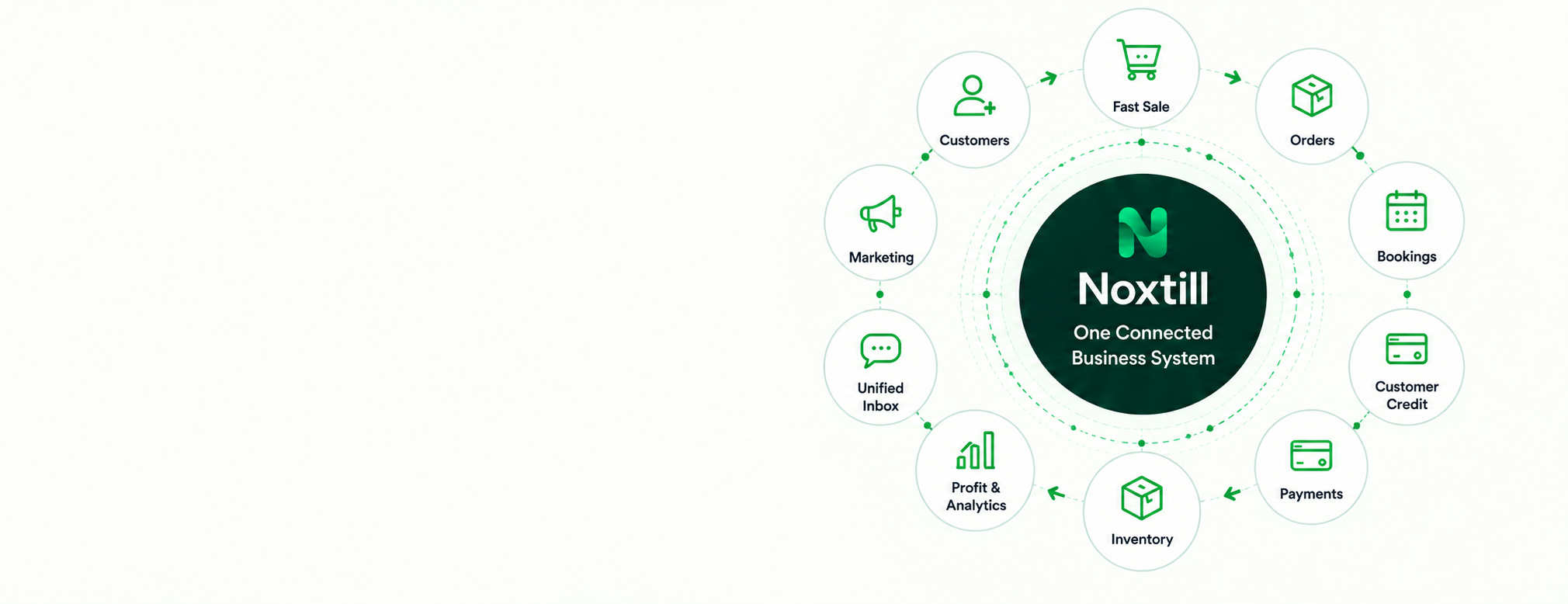
 AFTER · ONE CONNECTED RECORD
In this article
- What is all-in-one software?
- What “connected” means
- All-in-one vs separate apps
- When consolidation makes sense
- When specialist tools win
- 10 capabilities to compare
- Common software combinations
- How to choose
- Comparing pricing
- Do you need an ERP?
- Replacing spreadsheets
- Industry examples
- How Noxtill fits
- FAQ
- Sources
All-in-one business software for small business is attractive for a simple reason: most companies do not start with a software architecture. They start with a problem. A spreadsheet handles inventory. A calendar handles bookings. A CRM stores leads. An invoicing app handles payments. A messaging app holds customer conversations. A separate system manages employees. Each tool may work well on its own, but the business eventually starts paying an integration tax in duplicate data, manual handoffs, inconsistent statuses and extra subscriptions.
The problem is becoming more visible as small-business technology adoption rises. The U.S. Chamber of Commerce reported in 2026 that 41% of U.S. small businesses now use six or more technology platforms. In its 2025 reporting, 58% used four or more. That does not mean every company should immediately replace multiple business apps with one product. It means buyers should evaluate whether the gaps between tools are now costing more than the specialization those tools provide.
This small business software buying guide explains what all-in-one business software actually means, how it differs from a collection of separate apps, when integrated business software for small business is a better fit, when best-of-breed tools still make sense, and what to evaluate before moving CRM, POS, bookings, inventory, orders, payments, finance, support, staff, marketing and automation into a unified business management platform.
Quick answer: what is all-in-one business software?
All-in-one business software is a platform that manages several core business functions in one connected environment. A true all-in-one business management software product does more than place multiple tools under one login: customer, product, order, payment, staff, message and financial records should be able to move through cross-module workflows without constant copying, exports or duplicate setup.
In other words, “one platform to run a small business” should mean shared records, shared permissions, shared reporting and workflows that cross departments—not just a menu containing unrelated apps.
What “connected” should mean in practice
A connected business software platform should reduce the number of times the same fact needs to be entered or interpreted. The customer who books an appointment should be the same customer who appears in the CRM, receives an invoice, sends a message, leaves a review and appears in reporting. The product sold in POS should update the same inventory record used by purchasing. The payment attached to an invoice should also be visible to finance without someone reconciling separate application states manually.
All-in-one software vs separate apps
| Decision area | All-in-one platform | Separate best-of-breed apps |
|---|---|---|
| Data consistency | Shared records can reduce duplicate entry and conflicting statuses | Each tool may have stronger specialization, but data synchronization becomes a separate problem |
| User experience | One navigation model, permissions system and reporting layer | Different interfaces, logins, permissions and terminology |
| Workflow automation | Cross-module workflows can be native | Usually requires integrations, connectors or custom middleware |
| Feature depth | Breadth may be stronger than depth in some specialist functions | Specialist tools often go deeper in one function |
| Cost structure | Can simplify subscription and integration costs | Allows precise tool selection but costs can accumulate across vendors |
| Migration risk | Larger migration if many functions move at once | Smaller individual changes, but long-term integration complexity can rise |
| Vendor concentration | More operations depend on one platform | Risk is distributed, but ownership and support are fragmented |
When software consolidation usually makes sense
- Employees copy the same customer, order or payment details between systems every day.
- The business cannot answer a simple question—such as real profit, outstanding customer balance, or today’s workload—without combining exports.
- A customer changes details in one system but the old information remains in another.
- Bookings, sales, payments and inventory use separate status definitions and reports disagree.
- Automation requires a growing collection of connectors simply to keep basic records synchronized.
- Staff onboarding requires many logins and duplicate permission changes.
- Managers pay for overlapping features across several products but still rely on spreadsheets for the final view.
When separate specialist tools are still the better choice
Integrated software vs best-of-breed is not a moral choice. A specialized application can be the right decision when the business has complex industry requirements, needs certified or regulated functionality, relies on a highly mature workflow that the broader platform cannot match, or has a team large enough to maintain integrations properly. A good all-in-one software vs separate apps decision starts with process requirements, not with a desire to reduce the number of logos on the login screen.
The 10 capabilities to compare before choosing all-in-one business software
Common software combinations small businesses try to connect
Many “all-in-one” searches are actually combination searches. A buyer may not be looking for an ERP. They may simply want fewer handoffs between the tools that cause daily friction. Common requirements include:
- CRM invoicing scheduling all in one for appointment-based service teams.
- CRM inventory invoicing software for product and service businesses that both sell and bill.
- CRM booking invoicing software for businesses where appointments create invoices.
- CRM payments scheduling software or a booking CRM payments platform for teams collecting deposits and balances.
- CRM inventory accounting all in one for businesses trying to connect sales, stock and finance.
- POS inventory CRM all in one for retailers that need customer history and real-time stock from the checkout.
- CRM booking inventory software for businesses that reserve products, rooms, equipment or consumables as part of appointments.
- Sales inventory customer management software for businesses that want one operational view rather than three separate databases.
- Ecommerce inventory CRM software and POS ecommerce inventory integration for businesses selling online and in-store.
- Online and in-store business software or omnichannel small business software for organizations that need one product, customer and order record across channels.
How to choose all-in-one business software
Choosing business management software becomes easier when the team evaluates real workflows instead of comparing giant feature lists. The strongest business software comparison for small business uses the same scenarios across every vendor.
- Map five end-to-end workflows. Examples: lead → quote → order → payment; booking → reminder → service → review; sale → stock update → reorder; support request → resolution → follow-up; purchase request → approval → receipt → accounting.
- Identify the canonical record in each workflow. Decide which system should own the customer, product, order, payment, staff identity, message, document and financial entry.
- Test cross-module actions. Do not only test each module individually. Verify whether an event in one module updates the others correctly.
- Compare permissions. A complete business management software product should support appropriate access by role, team, branch and responsibility.
- Evaluate reporting traceability. Can a manager click from a dashboard metric to the records behind it, or is reporting a separate analytics island?
- Calculate total cost of ownership. Include subscriptions, implementation, integrations, migration, training, data cleanup and the internal time spent maintaining connectors.
- Test exportability and exit paths. A single platform should simplify operations, not trap the business. Confirm data exports and migration options.
- Run a staged rollout. Move the workflows with the greatest integration pain first instead of changing every system on the same day.
| Criterion | What to test | Platform A | Platform B |
|---|---|---|---|
| End-to-end workflows | Lead → quote → order → payment; booking → reminder → service → review | ||
| Canonical records | Which system owns customer, product, order, payment, staff and finance records | ||
| Cross-module actions | An event in one module correctly updates the others | ||
| Permissions | Role, team, branch and record-level access | ||
| Reporting traceability | Click from a dashboard number to the records behind it | ||
| Total cost of ownership | Licenses, modules, usage, migration, training, connectors, staff time | ||
| Exportability & exit | Full data export and migration options | ||
| Staged rollout | Can the highest-pain workflow move first? |
How to compare all-in-one business software pricing
All-in-one business software pricing can look cheaper or more expensive depending on what the comparison includes. An affordable all-in-one business software product may replace several subscriptions, but migration and onboarding still have a cost. Separate applications may have low individual prices while integrations, extra user seats, add-ons and reporting tools increase the real total.
Build a simple 12-month comparison that includes base licenses, required modules, usage fees, messaging or payment costs, integration middleware, implementation, data migration, support, and the staff time currently spent maintaining duplicate records. The goal is not automatically to reduce the SaaS subscriptions small business teams use; the goal is to reduce unnecessary complexity without losing needed capability.
Do small businesses need ERP?
Does a small business need an ERP? Sometimes, but the label is less useful than the requirements. Traditional ERP systems are often centered on finance, inventory, supply chain and resource planning. Modern small business operations software may combine ERP-like back-office functions with CRM, bookings, communications, field service, marketing and customer experience. Buyers should evaluate the workflows they need rather than choosing software because it fits a category name.
When should a small business replace spreadsheets?
A spreadsheet is not automatically a problem. It is excellent for analysis, temporary planning and flexible calculations. It becomes risky as an operational system when multiple people edit the same process, there is no reliable audit trail, the same data must be copied into customer or financial systems, workflows depend on someone remembering the next step, or the sheet is effectively acting as a database without controls.
Industry examples: what “all-in-one” means by business type
- All-in-one software for service business: CRM, bookings, quotes, jobs, payments, messages, reviews and staff scheduling. Industry page →
- All-in-one software for contractors and business management software for contractors: lead capture, estimating, work orders, field teams, materials, documents, invoicing and reviews. Industry page →
- All-in-one software for home service business, including business software for plumbers, HVAC companies, electricians and cleaning companies: calls, dispatch, jobs, customer history, payments and follow-up. Industry page →
- Business software for salons and spas: online booking, staff availability, customer profiles, packages, payments, reminders and reviews. Industry page →
- Business software for auto repair shops and business software for car detailing: appointments, vehicle/customer records, work orders, inventory, payments and review follow-up. Industry page →
- Business software for property management company: customer/tenant records, messages, maintenance requests, documents, tasks and billing workflows. Industry page →
- All-in-one retail business software and small retail business management software: retail POS CRM inventory software, products, purchasing, customers, returns, online commerce and reporting. Industry page →
- Ecommerce business management platform: product catalog, inventory, online orders, customer records, payments, marketing and finance context. Industry page →
- Business software for local businesses: one system for daily operational records, customer interaction, payments, staff, automation and management reporting.




How Noxtill fits the all-in-one model
Noxtill is an AI-powered business management platform with connected modules across sales, customers, bookings, inventory, payments, finance, staff, communications, marketing, operations, reporting and automation. The design principle is that each business object has a canonical owner: customers in CRM, products in Products & Services, stock in Inventory, orders in Orders, payment transactions in Payments & Billing, messages in Unified Inbox, workflow executions in Automations & Workflows, documents in Documents, assets in Assets & Maintenance, and accounting records in Finance & Accounting.
That architecture matters more than the raw module count. A unified small business platform should make a sale in Fast Sale update stock, a payment update the relevant invoice and customer history, a booking appear in the operational calendar, a support conversation attach to the same customer, and reports reflect those events without parallel manual status systems. Staff, shifts and pay live in People & Payroll; online orders arrive through Website & Commerce; field jobs run through Field Service & Work Orders.
FAQ: all-in-one business software
What is all-in-one business software?
It is a platform that combines multiple operational functions such as CRM, sales, bookings, inventory, payments, finance, support and automation while allowing those functions to share records and workflows.
What is business management software?
Business management software is a broad category for systems that help companies manage operational data, workflows, customers, staff, finances and reporting. Some products cover one function; others are integrated platforms.
What is a business operating system?
The phrase usually describes a connected software layer for running several business functions from shared data and workflows. It is a positioning term rather than a formal software standard.
Does a small business need an ERP?
Not necessarily. A small business should choose the capabilities and workflows it needs. Some will benefit from ERP-style finance and inventory; others need a broader CRM, booking, payments and operations platform.
Is all-in-one software better than separate apps?
It is better when shared records and cross-functional workflows matter more than the deepest specialist features. Separate tools may be better when a business has specialized requirements that an integrated platform cannot meet.
How many software tools does a small business need?
There is no correct number. The better question is whether the tools create reliable workflows without duplicate data, excessive integration maintenance or confusing ownership.
How do you centralize small business operations?
Start with shared master records, then connect the highest-friction workflows such as lead-to-sale, booking-to-payment, sale-to-inventory and support-to-customer history.
How can a small business reduce software costs?
Audit overlapping subscriptions, connector costs, unused seats, duplicate features, implementation effort and the staff time spent moving data between systems. Consolidate only where the replacement meets real requirements.
What should a business test before switching platforms?
Test real end-to-end workflows, permissions, reporting, data migration, integrations, exportability, mobile use, support and exception handling.
When should a small business replace spreadsheets?
When a spreadsheet becomes a multi-user operational database, drives repeated manual handoffs, lacks controls or causes conflicting customer, stock, payment or financial records, it is time to evaluate a more structured system.