

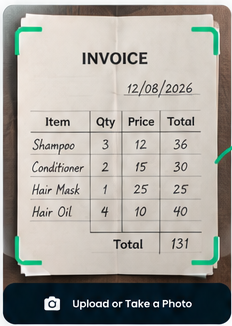
Totals check
Catches the sum that doesn’t add up.
Each line is worked out from its quantity and price, then added up and compared with the total printed on the invoice. If they differ, or a line can’t be read, the scan is flagged before it reaches your books.
Invoice #4471 · Fresh FarmsTotals don’t match
Line 3 couldn’t be read, so it isn’t in the sum. Check the original or retake the photo.
Where it goes
The right place, every time.
Receipts and invoices become expenses by default. A business card becomes a supplier. You can change where any row goes before approving.
Receipts
Shop and fuel receipts become expenses with their date and amount.
Supplier invoices
Line items, the supplier and the invoice total, checked against each other.
Business cards
New suppliers with their phone and email.
The original
The photo stays with the expense for your records.

FAQs
Receipt and invoice scan questions.
Related: Document Scanning · Data Extraction · Review & Approve Data
What does it read from an invoice?
The supplier, the date, each line with quantity and price, and the printed total.
What if the total doesn’t match the lines?
The scan is flagged with the difference and any line it couldn’t read, so you can check before approving.
Where do scanned receipts end up?
As expenses by default. You can send any row somewhere else, such as a supplier record, during review.
Can I keep the paper copy digitally?
Yes. The original photo or PDF stays attached to the scan.
Is anything posted automatically?
No. The expense is prepared for you and saved only after you approve it.
No more shoebox of receipts.
Start a 14-day free trial or book a demo to scan your first invoice.